

Competitor pricing and feature information updated March 2026.

There are ways to improve one's reporting without recreating everything they already have in MS Access.This guide will break down our top five BI tools and apps for MS Access users.
What is Microsoft Access?
Microsoft Access is an information management tool and an excellent database management system. It is used to help individuals and organizations store information for reference, analysis, and reporting. The platform has been popular for many years, mainly because it makes it easy to analyze massive data. Thanks to its Microsoft Access database, it also helps manage relational data with more efficiency than spreadsheet software. MS Access uses a variant of SQL called T-SQL. Any tool that reports on MS Access needs to use T-SQL, which limits many BI tools to integrate with the platform. Just as well, MS Access is usually installed on local servers instead of the cloud, which makes it challenging to use many of the more modern BI tools out there that require data-cloud transfer. As a result, it's vital to choose a device that can be installed locally and is entirely self-hosted.Top Five BI Tools for Microsoft Access
Let's take a look at some of our top picks for MS Access BI tools that can make reporting a bit easier.Tableau Desktop
Tableau Desktop is a data visualization tool designed to help users see and grasp data quickly. Users can connect this BI tool to Microsoft Access files to set up data sources. It's a reasonably helpful tool, but it is worth noting that Tableau does not support OLE DB, OLE Object, and hyperlink data types, which could be problematic for some individuals. While a single-user desktop edition is free, team-based versions of Tableau can be extremely expensive with mandatory annual commitments. Standard plans start at $75/month for Creator licenses, with Explorer users at $42/month and Viewer access at $15/month. Enterprise tiers push costs even higher: Creator at $115/month, Explorer at $70/month, and Viewer at $35/month. For a modest team requiring just 25 users, you're looking at $1,050/month or more – a significant barrier for organizations seeking budget-friendly MS Access reporting solutions. However, Tableau Desktop supports T-SQL, which is key for MS Access support.Microsoft Access Report Wizard
Of course, Microsoft Access Report Wizard is a natural choice for MS Access reporting as it is a Microsoft product. This is basically what most users are stuck with, as it is built into MS Access. Still, Microsoft Access Report Wizard does have its valuable moments for the Microsoft SQL Server. Once the user chooses their record source, they might find it easier to create their reports using Report Wizard. Less of an automated tool and more of a guide, Report Wizard will guide the user through a group of different questions and automatically create a report based on the answers given. Microsoft Access Report Wizard naturally supports T-SQL since it is built into MS Access. It is also safe to say that Microsoft Office users might find it easy to use for Microsoft Office Access and Microsoft Office applications.Custom Queries
Custom queries have become the go-to for many businesses who aren't very satisfied with Microsoft Access out of the box. Essentially, you can hire a developer to write SQL queries and do all the necessary complex code reporting via T-SQL. Many T-SQL developers have many years of experience doing reporting processes for Microsoft Access, so finding the ideal freelancer won't be difficult.Crystal Reports
If you have an in-house developer or know a bit about development, you could use Crystal Reports with MS Access. This legacy reporting tool requires a substantial upfront investment – Designer licenses cost $495 per user, and Crystal Server deployments start around $8,700 or more for team environments. Crystal Reports 2020's mainstream support ends in December 2026, while CR 2025 has mainstream support through December 2027. However, SAP is clearly focusing investment on SAP Analytics Cloud rather than Crystal's future development. The platform remains Windows desktop-only with no cloud version, and web viewing requires Crystal Server or third-party solutions, adding complexity and cost. While Crystal can generate custom reports from various data sources and supports T-SQL for MS Access integration, you're essentially moving from one legacy platform to another. All the same technical developer requirements for building and maintaining reports persist, making this choice counterproductive for teams seeking modern, user-friendly solutions.Azure Data Studio
Azure Data Studio is another option for reporting with MS Access. A bit more modern than many of the choices we've listed, Azure Data studio is tied to the Azure cloud. With this in mind, it might be difficult to migrate your MS Access databases to the cloud with this tool, which might disqualify this option for many who still use MS Access. This platform has its upsides. Azure Data Studio is a cross-platform database tool designed to help data professionals manage their on-premise and cloud-based platforms. This tool offers a sophisticated and modern editor that uses IntelliSense and code snippets, along with an integrated terminal. Azure Data Studio supports Azure SQL and T-SQL.That Bonus Option (Surprise: It's DashboardFox)
Microsoft Access is a great tool for businesses, but with its downsides. Rather than throwing it out or doing an expensive software migration, in many cases, you're better off bundling a modern BI platform on top of it. With that, we present you with the bonus option, DashboardFox. DashboardFox is a proven BI tool in the industry and can do a lot more than just reporting from MS Access. But the key for this article, DashboardFox, includes specific features designed to work with the T-SQL requirements of MS Access. Small things like ensuring table names are encapsulated with square brackets [] and wrapping parenthesis around each separate JOIN in the FROM statement. OK, that got too technical, but the point, we have a specific DB Platform for MS Access to handle all its "uniqueness."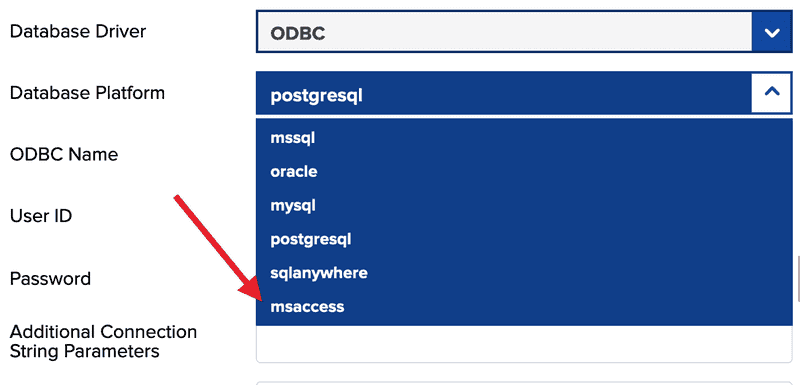
- We only charge once, and that's it (no subscriptions to maintain at all).
- Interactive dashboards and reports with drill-down and filtering.
- We are self-hosted and on-premise, so your data stays local and is secure with you.
- Robust data-level and role-based security, so you can share internal and external data.
- Our team of experts is always one email away whenever you need help with anything.
We can safely say that we are the ones you are looking for, and bonuses are meant to make people happy.So, if you want to start your new year with better business intelligence solutions, give us a call, or much better, book a free live demo with our team of experts so that we can show you why bonus options are always the best ones available. How was our article about the top five business intelligence tools for MS Access? Let us know which tool is your personal favorite in the comments below.
Prefer a managed, no-install option?
DashboardFox is also available as a cloud SaaS — row-level security, white-label branding, and unlimited dashboards included from $99/month. No servers to manage.
Start a 7-day free trial, no credit card required →